Showing posts sorted by relevance for query blogger. Sort by date Show all posts

Welcome AOL Journals Users!


As some of you might know, AOL has recently decided to sunset its AOL Journals service. To help Journals users continue to share their thoughts online, Blogger has built a simple migration tool to move an AOL Journal to Blogger. We'd like to welcome our new Blogger users to the community and are looking forward to hearing what they have to say!

We've been hard at work here at Blogger and have added a number of new features in the past few months. If you're a Journals user who wants to explore our features, or even if you're already a Blogger user but you want to see what's new, check out our features page. Over in our user group you can share your blog with others or find new blogs to follow. If you're still hungry for more blogs, the Blogger team regularly posts interesting and noteworthy Blogger-powered blogs at Blogs of Note.

Below are some more resources for new Journals users. Welcome again!

Link - from Blogger Buzz


Related:

Reduce your carbon footprint in five simple steps

Hispanic College Fund scholars visit Google D.C.
New steps to protect free expression and privacy around the world

Google Apps Goes Experimental with Google Labs

Read the rest of this entry »

Blogger.com - more like a big truck, less like a series of tubes

Here at Blogger we're always working to make the site and your blogs faster and more reliable. We want you to think of us as a big truck: able to handle anything you can dump on us.

Tuesday's election was a good chance to see just how big a truck Blogger actually is, and we're happy to report that Blogger-hosted blogs, for the most part, held up under the record-setting traffic.

That being said, there were definitely some hiccups (potholes?) along the way. Our favorite political and polling analysis blog, FiveThirtyEight.com, received an order of magnitude more visitors than the next most visited blog. They also received more than 50 times as many comments as the next most commented-on blog. Unfortunately, this traffic caused some publishing delays for Nate and Sean as well as some intermittent slowness on their site.
After we got word of the trouble, we were able to shift some resources around to keep things running fairly smoothly for the rest of the night. Now that traffic has calmed down, our engineers are hard at work tuning and improving Blogger based on the experience.

We'd like to thank bloggers, commenters, and readers for participating in one of the biggest blogging events ever. Your voices validate what we do, and every day we look forward to making Blogger faster and better for you.

Better Cooking Through Reader-ing

Link - from Blogger Buzz
Related From Google Blogs:
Top 5 holiday tips for Google Product Search merchants
Picasa -- it's not just for photos, anymore!
Better Cooking Through Reader-ing
New Google Talk Help Forum
Read the rest of this entry »

Follow your favorite blogs


Some people dream of being a rock star, while others just want a few discerning souls to become avid readers of their blogs. Both are noble pursuits, but with some good pictures, and a witty turn of phrase or two, building a Blogger fan-base may be a more attainable dream.

At Blogger we're passionate about helping communities form around blogs. To further that goal, we've introduced a new feature that lets you easily follow your favorite blogs and tell the world that you're a fan. To follow a blog with the Followers' Gadget, simply click the "Follow This Blog" link. You can show your support for the blog by following it right from your Blogger Dashboard or in Google Reader.

Following isn't just for bloggers, it's also designed to make it easier for readers to keep tabs on their favorite blogs. Maybe you're following a wedding blog for tips, have a thing for plush toys, or perhaps you want to keep track of Google's university bus tour.

In addition, you can easily check out what blogs other fans are writing and following - you might even find another blog you'll want to add to your reading list. And by the way, you can follow any blog, even if it isn't hosted on Blogger or doesn't have the Followers gadget. Just go to your Reading List in your Blogger Dashboard, click the "Add" button, and type in the blog's URL. And you can even import existing subscriptions from Google Reader.

This feature is currently only available in English, but we plan to make it available in more languages soon. We're also in the process of integrating with Google Friend Connect to add even more engaging social features to Blogger.

So start following. We hope you become a fan.


Link - from The Official Google Blog
Related:
Whose turn is it to reply? Check out conversation view for scraps
Orkut on the iPhone— a socialite's dream come true
iGoogle launches canvas view
Gadgets and Google Code

Read the rest of this entry »

Blogger Following for All

A few posts ago we let you know about Blogger Following. The feature lets readers publicly subscribe to your blog (so you know who's reading) and adds a Reading List to your Blogger Dashboard so readers can stay updated with the blogs they follow.

Now it's available to all users in English. We'll keep you updated about when we launch it in Blogger's other languages.

To learn more about Following, read the Blogger Buzz Post or the Google Blog Post.


Link - from Blogger Buzz

Related:
A picture is worth a thousand words
New in Labs: Canned Responses
Commenting made easier
Reading The Guardian, full-text style
Read the rest of this entry »

Commenting made easier

Today we’re bringing the embedded comment form out of Blogger in draft and making it easily available to everyone. This feature puts the comment form at the bottom of each post page, below the comments, instead of on the separate, Blogger-styled page.

The embedded comment form is more convenient for your readers because they can use it to post a comment immediately, without clicking over to a different page. It also looks better, since it matches your blog’s style and colors.


If you’re logged in to Blogger with your Google Account, you can also subscribe to comments via email by clicking the “Subscribe” link. Unlike with the full page comment form, you don’t need to post a comment to subscribe.

To enable the embedded comment form for your blog, go to the Settings > Comments page and look for the Comment Form Placement setting. Change it to Embedded below post, save your settings, and go check out a post to see the new form in action.

The embedded comment form works on both Classic and Layouts templates, though if you’re using a heavily-customized Layouts template you may need to reset your widget templates before the embedded comment form will appear.

We think that the embedded comment form is a big improvement, so we’ve made it the default setting for all new blogs.

Happy commenting!
Read the rest of this entry »

Blogger Buzz: Three new languages and a whole new direction for Blogger

Read the rest of this entry »

Saving Bandwidth Made Easy: Google Data JavaScript Packaging


At Google, we believe it's important to conserve limited resources, whether it's the environment or bandwidth. While it won't help with global warming (we have other projects for that), our new support for packages in our Google Data JavaScript client library can help with the bandwidth.

This feature allows you to specify precisely which Google Data services you'll be using in your applications. We then use this information to send just the library code you need, leaving out all the rest. Less code sent across the wire means faster page loads for your applications. Faster page loads mean happier users.

For comparison, the current version of the JavaScript client library is 47 KB in size. If you request only the Blogger package, that library shrinks to 37 KB, a 21% reduction.

To take advantage of this, just add a packages argument when you're loading the client library. For example, the following statement would request only the code necessary for working with the Blogger and Contacts APIs:

google.load("gdata", "1.x", { packages : ["blogger", "contacts"] });

If you don't specify a packages argument, you'll receive all available packages, just as before. This means that your old code will continue to work just as it is.

If you have any questions, feel free to drop by our discussion groups where you'll find other developers ready to lend a helping hand.

Link - from Google Data APIs Blog
Related:
This is a test: Video content on AdSense
Updated Program Policy page
Inside AdSense launches in Italian
Bienvenido to the Spanish Help Forum
Read the rest of this entry »

First Android Patch Accepted!

By Jeff Bailey, Open Source Team

This morning at 8 AM Pacific, I had the joy of participating in the Android release. If you've been following along, you'll have seen how excited we've been - and are - to publish millions of lines of code to the outside world.

Well, the number just went up by six more lines. It's a small start, but knowing that we accepted our first patch from a contributor external to the Open Handset Alliance just 4.5 hours after unveiling the code reinforces to me why open sourcing this is exactly the right thing to do.

Happy Hacking. =)

(Update: I just checked, and we're up to 5 accepted patches from 8 submitted. Way cool.)
Read the rest of this entry »

Add Google News to Your Site


If you are a web site owner, a blogger, or a professional site designer, take a look at the latest creation from the AJAX Search API team. With just a few clicks, anyone can configure and add a sleek looking Google NewsBar to their site.


The NewsBar is designed with your needs in mind. It can be configured in a horizontal mode where it delivers a continuous stream of news headlines to your site. The vertical mode delivers both news headlines and snippets. The NewsBar is perfect for your topical sites or blogs. For instance, if you are following the Barack Obama vs. Hillary Clinton race, try this NewsBar.

If you are a professional developer and want to use some of the more advanced features of the NewsBar, there is a complete developer guide that will walk you through all of the options. If you run a blog on Blogger, the NewsBar is already built in. To add it to your blog, just edit your blog's layout, and add the "Newsreel" page element.

A few controls that might complement your use of the NewsBar are, The YouTube VideoBar, The LocalSearch Control for Google Maps, the Slideshow Control, and the Dynamic Feed Control.
Link - from Google News Blog
Related From Google Blogs:
Say hello to Gmail voice and video chat
Read the rest of this entry »

Use the Google Data JavaScript client library with Chrome and Safari


The Google Data JavaScript client library has expanded its support to cover our latest browser Chrome as well as Safari 3.x.

Now you can start writing AJAX applications that use the Google Data JavaScript client library and have your apps be compatible with the following desktop browser environments:


  • Internet Explorer 6 & 7
  • Firefox 2.x & 3.x
  • Safari 3.x
  • Chrome
The Google Data JavaScript client library is a pure JavaScript library that allows you perform cross-domain AJAX read/write operations for several Google services - Google Calendar, Blogger, Google Contacts, and Google Finance.

Check out some of the creative applications that were written using the Google Data JavaScript client library--

Calendar Visualization using Google Calendar Data API:


Contacts Picker using Google Contacts Data API:


blog.gears using Blogger Data API and the Gears API:


Ready to get started building your own app? Click on the links to the individual services above to use the interactive developer's guides and drop by in the forums if you have any questions and want to chat with other developers.

Link - from Google Data APIs Blog
Related:
Bioneers, Day Three
New in Labs: Canned Responses
Make a date with data in Google Analytics
The case of the delayed data
Read the rest of this entry »

Official Google Blog: Three more languages for Blogger

Read the rest of this entry »

Reactions: easily engage your readers

One of our goals at Blogger is to make it easy for authors to get feedback on their content; we believe that authors are driven in part by the reactions and criticisms offered by their readers, and that these interactions enhance the quality of blog content. In support of this effort, we're launching Reactions, simple annotations chosen by authors and given by readers.


With Reactions, readers can easily respond with one click, increasing feedback on posts.

Photo by Kevin Steele

To enable Reactions, log in to your dashboard, go to Layout > Page Elements and click the Edit link in the Blog Posts element to open the blog post configuration tool. Then, check the box next to Reactions, edit your reactions as a comma-separated list, and click Save.


Reactions works with Layouts templates, though if your template is heavily customized, you may have to reset your widget templates for Reactions to appear. If you have a Classic template you will need to switch to Layouts to use Reactions.

Of course, Reactions isn't the only way to gather great feedback from readers; we also recently launched the Embedded Comment Form. With both Reactions and better commenting, we aim to make it easier for you to get the response and adoration you deserve.

Try Reactions now! We hope your reaction is <3.

Corrected to say that Reactions is a Layouts-only feature.

Link - from Blogger Buzz
Related From Google Blogs:
New in Labs: Calendar and Docs gadgets
Ending our agreement with Yahoo!
A Deadly New Arenavirus
Aptera Recognized for Innovation

Read the rest of this entry »

Where's my data?

Today we're going back to basics. We'll be answering the question: What is a website?

...Okay, not exactly. But we will be looking into what a "website" means in the context of Webmaster Tools, what kind of sites you can add to your Webmaster Tools account, and what data you can get from different types of sites.

Why should you care? Well, the following are all questions that we've gotten from webmasters recently:

  • "I know my site has lots of incoming links; why don't I see any in my Webmaster Tools account?"
  • "I see sitelinks for my site in Google's search results, but when I look in Webmaster Tools it says 'No sitelinks have been generated for your site.'"
  • "Why does my Top search queries report still say 'Data is not available at this time'? My site has been verified for months."

In each of these cases, the answer was the same: the data was there, but the webmaster was looking at the wrong "version" of their domain in Webmaster Tools.

A little background

The majority of tools and settings in Webmaster Tools operate on a per-site basis. This means that when you're looking at, say, the Top search queries report, you're only seeing the top search queries for a particular site. Looking at the top queries for www.example.com will show you different data than looking at the top queries for www.example.org. Makes sense, right?

Not all websites have URLs in the form www.example.com, though. Your root URL may not include the www subdomain (example.com); it may include a custom subdomain (rollergirl.example.com); or your site may live in a subfolder, for example if it's hosted on a free hosting site (www.example.com/rollergirl/). Since we want webmasters to be able to access our tools regardless of how their site is hosted, you can add any combination of domain, subdomain(s), and/or subfolder(s) as a "site" on your Webmaster Tools dashboard. Once you've verified your ownership of that site, we'll show you the information we have for that particular piece of the web, however big or small it may be. If you've verified your domain at the root level, we'll show you data for that whole domain; if you've only verified a particular subfolder or subdomain, we'll only show you data for that subfolder or subdomain. Take Blogger as an example—someone who blogs with Blogger should only be able to have access to the data for their own subdomain (googlewebmastercentral.blogspot.com), not the entire blogspot.com domain.

What some people overlook is the fact that www is actually a subdomain. It's a very, very common subdomain, and many sites serve the same content whether you access them with or without the www; but the fact remains that example.com and www.example.com are two different URLs and have the potential to serve different content. For this reason, they're considered different sites in Webmaster Tools. Since they're different sites—just like www.example.com and www.example.org—they can have different data. When you're looking at the data for www.example.com (with the www subdomain) you're not seeing the data for example.com (without the subdomain), and vice versa.

What can I do to make sure I'm seeing all my data?

  • If you feel like you're missing some data, add both the www and the non-www version of your domain to your Webmaster Tools account. Take a look at the data for both sites.
  • Do a site: search for your domain without the www (e.g. [site:example.com]). This should return pages from your domain and any of your indexed subdomains (www.example.com, rollergirl.example.com, etc.). You should be able to tell from the results whether your site is mainly indexed with or without the www subdomain. The version that's indexed is likely to be the version that shows the most data in your Webmaster Tools account.
  • Tell us whether you prefer for your site to be indexed with or without the www by setting your preferred domain.
  • Let everyone else know which version you prefer by doing a site-wide 301 redirect.

Even though example.com and www.example.com may look like identical twins, any twins will be quick to tell you that they're not actually the same person. :-) Now that you know, we urge you to give both your www and non-www sites some love in Webmaster Tools, and—as usual—to post any follow-up questions in our Webmaster Help Group.

Related:
Read the rest of this entry »

Keeping comment spam off your site and away from users

So, you've set up a forum on your site for the first time, or enabled comments on your blog. You carefully craft a post or two, click the submit button, and wait with bated breath for comments to come in.

And they do come in. Perhaps you get a friendly note from a fellow blogger, a pressing update from an MMORPG guild member, or a reminder from your Aunt Millie about dinner on Thursday. But then you get something else. Something... disturbing. Offers for deals that are too good to be true, bizarre logorrhean gibberish, and explicit images you certainly don't want Aunt Millie to see. You are now buried in a deluge of dreaded comment spam.

Comment spam is bad stuff all around. It's bad for you, because it adds to your workload. It's bad for your users, who want to find information on your site and certainly aren't interested in dodgy links and unrelated content. It's bad for the web as a whole, since it discourages people from opening up their sites for user-contributed content and joining conversations on existing forums.

So what can you, as a webmaster, do about it?

A quick disclaimer: the list below is a good start, but not exhaustive. There are so many different blog, forum, and bulletin board systems out there that we can't possibly provide detailed instructions for each, so the points below are general enough to make sense on most systems.

Make sure your commenters are real people
  • Add a CAPTCHA. CAPTCHAs require users to read a bit of obfuscated text and type it back in to prove they're a human being and not an automated script. If your blog or forum system doesn't have CAPTCHAs built in you may be able to find a plugin like Recaptcha, a project which also helps digitize old books. CAPTCHAs are not foolproof but they make life a little more difficult for spammers. You can read more about the many different types of CAPTCHAS, but keep in mind that just adding a simple one can be fairly effective.

  • Block suspicious behavior. Many forums allow you to set time limits between posts, and you can often find plugins to look for excessive traffic from individual IP addresses or proxies and other activity more common to bots than human beings.

Use automatic filtering systems
  • Block obviously inappropriate comments by adding words to a blacklist. Spammers obfuscate words in their comments so this isn't a very scalable solution, but it can keep blatant spam at bay.

  • Use built-in features or plugins that delete or mark comments as spam for you. Spammers use automated methods to besmirch your site, so why not use an automated system to defend yourself? Comprehensive systems like Akismet, which has plugins for many blogs and forum systems and TypePad AntiSpam, which is open-source and compatible with Akismet, are easy to install and do most of the work for you.

  • Try using Bayesian filtering options, if available. Training the system to recognize spam may require some effort on your part, but this technique has been used successfully to fight email spam.

Make your settings a bit stricter
  • Nofollow untrusted links. Many systems have a setting to add a rel="nofollow" attribute to the links in comments, or do so by default. This may discourage some types of spam, but it's definitely not the only measure you should take.

  • Consider requiring users to create accounts before they can post a comment. This adds steps to the user experience and may discourage some casual visitors from posting comments, but may keep the signal-to-noise ratio higher as well.

  • Change your settings so that comments need to be approved before they show up on your site. This is a great tactic if you want to hold comments to a high standard, don't expect a lot of comments, or have a small, personal site. You may be able to allow employees or trusted users to approve posts themselves, spreading the workload.

  • Think about disabling some types of comments. For example, you may want to disable comments on very old posts that are unlikely to get legitimate comments. On blogs you can often disable trackbacks and pingbacks, which are very cool features but can be major avenues for automated spam.

Keep your site up-to-date
  • Take the time to keep your software up-to-date and pay special attention to important security updates. Some spammers take advantage of security holes in older versions of blogs, bulletin boards, and other content management systems. Check the Quick Security Checklist for additional measures.

You may need to strike a balance on which tactics you choose to implement depending on your blog or bulletin board software, your user base, and your level of experience. Opening up a site for comments without any protection is a big risk, whether you have a small personal blog or a huge site with thousands of users. Also, if your forum has been completely filled with thousands of spam posts and doesn't even show up in Google searches, you may want to submit a reconsideration request after you clear out the bad content and take measures to prevent further spam.

As a long-time blogger and web developer myself, I can tell you that a little time spent setting up measures like these up front can save you a ton of time and effort later. I'm new to the Webmaster Central team, originally from Cleveland. I'm very excited to help fellow webmasters, and have a passion for usability and search quality (I've even done a bit of academic research on the topic). Please share your tips on preventing comment and forum spam in the comments below, and as always you're welcome to ask questions in our discussion group.


Link - from Google Webmaster Central Blog
Related: Google Earth Team trains 'non-profiteers' at Bioneers
Read the rest of this entry »

Friends Everywhere, and other Friendly Features

It's Tuesday here, so the Reader team is happy to announce a bunch of new features: friends worldwide, tagging with note, alphabetical ordering, and even last-crawl-date. Fun!

Friends Everywhere

Friends in French Now that our new and improved sharing features are available in the US, we have made sharing with friends available to Reader users in all supported languages. We are dedicating this to our teammate Steve Goldberg, who claims he can speak almost every language in which Reader is available.

Tagging while Sharing and Noting

Add a tag while Sharing with NoteNotes are great, but sometimes a note just isn't enough. Notes occasionally need more color, more flavor, more organization. So, you can now add a tag while adding a note. This is especially useful if you use lots of tags to organize your posts, or if you have multiple public shared tags. We'd like to dedicate this to our newest teammate, Mike Knapp, who enjoys being user-facing.

Sort your Subscriptions

We've had countless hours of fun dragging n' dropping our feeds to keep them organized, but that can get annoying. So, in a move to delight lexicographers everywhere, you can now choose between alphabetical ordering or drag n' drop ordering for your subscription list, via an "Options" menu at the bottom-left of Reader's interface. This feature is dedicated to Ben Darnell, whose name is near the start of the alphabet.

Sort your feeds alphabetically

And, as a bonus, we've exposed the date we last crawled a feed in the "details" area, and made some iPhone speed improvements and bug fixes. Have a happy Tuesday, and, as always, let us know what you think of our new features.

Link - from Google Reader
Related: Get your Blogger following fix (in Reader)
Read the rest of this entry »

Google Rolls out Gmail Voice and Video Chat…Slowly…

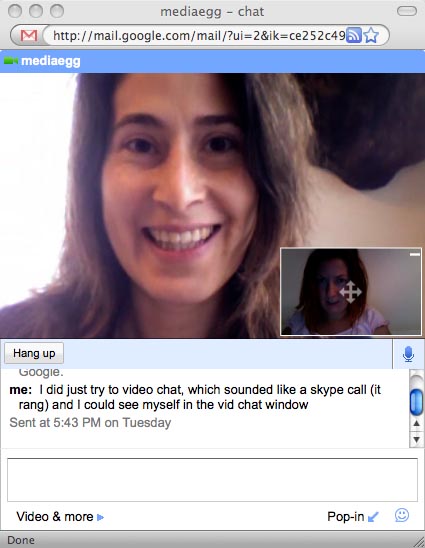
Gmail voice and video chat

Google just launched video and voice chat today for both PC and Mac. My first reaction? That is so cool.

The only problem is the announcement went out before they had actually activated many accounts. Including mine. Luckily, I had the email address of the Google contact who sent out the announcement, and he spent some time troubleshooting with me. First order of business? Getting my email account activated as well as that of my initial Gmail voice and video chat guinea pig, Scott from Alaska HDTV (@alaskapodshow on Twitter).

After about an hour, Scott still could not see the video options in his Gmail chat box. While he and I continued to restart browsers and compare notes, I received a text chat message from my friend Kris, a multimedia producer and documentary filmmaker in Brooklyn (@krisbritt on Twitter). She had seen my Tweets about my attempts to test out the new Gmail voice and video chat.

I invited her to video chat and within moments and after just a few rings, the video chat window opened, and there was Kris. The picture was clear, the sound was clear.

Right away I thought “This is much better than Skype.”

Don’t get me wrong. I love Skype, but it can fizzle and pop now and then. WWD blogger Samuel Dean also tested Gmail voice and video chat and points out that it falls short compared to Skype because it doesn’t connect calls to landlines and doesn’t offer voice mail. It does, however, allow you to record a video chat. Ah, the possibilities!

Right away, Kris echoed my feelings that Gmail voice and video chat is convenient and a great addition to the Google suite of tools - perfect, for example, to use while reviewing a Google Doc with someone else. Having video and voice chat within Gmail also means you’ll get more functionality with less open applications and windows.

Gmail voice and video chat

Some quick things to know before you dash off to download the video chat add-on for your browser:

1. Your account must be activated by Google for video, and this could take a few more days.

2. Your chat friend must have Gmail voice and video chat add-on installed for it to work. Otherwise they will be directed to the download page for the add-on.

3. You can tell if a friend is video-chat enabled by a little video camera icon to the left of their name on the contacts Chat List in your Gmail account.

4. You can invite someone to video chat with the Video Options button at the bottom of the chat box.

5. You can pop out the video into it’s own window and move it around as well as open it to full screen.

One possible software conflict? The latest Flash player may interfere with the proper installation of the video add-on (this is just a guess from Scott who eventually switched computers and was able to video chat immediately).

Troubleshooting tips? Make sure your browser is closed before you install the add-on. Then you may have to restart your browser a few times until it takes. Just something anecdotal. Probably not in the manual.

Have long did it take to get Gmail voice and video chat to work for you? What do you think you’ll use it for?

Read the rest of this entry »

iGoogle launches Reader integration

It's a little known fact that Reader and iGoogle are siblings. They share some parents (hi Steve!). They've both been growing up fast since their respective launches in mid-2005. They even sat next to each other for a while.

When we heard about the iGoogle team's plans to have a canvas view (allowing for much richer content), we thought it would be great to help a brother (or is it sister?) out. We therefore took on the task of powering iGoogle's new canvas view for feeds. Now you can get the same powerful Reader interface for any feed in iGoogle, complete with keyboard shortcuts, expanded and list views, infinite scrolling and embedded videos.

For those of you who are Reader users already, the Reader gadget has also been updated to take advantage of the canvas view: you can now share, email and browse through your folders and subscriptions, all within iGoogle.

You can see both the new feed view and the updated Reader gadget in action on the updated iGoogle.

Link - from Google Reader
Related:
One word to describe Google Reader...
Two New Power Readers, and Canada
Friends Everywhere, and other Friendly Features
Get your Blogger following fix (in Reader)
Read the rest of this entry »

Thousand Parsec and Google Summer of Code

By Tim Ansell, Technical Solutions Engineering Team and Thousand Parsec Project Co-Founder

This was the second year that Thousand Parsec partook in the Google Summer of Code™, and we accomplished even more than we did in our very successful first year. For those who don't know, Thousand Parsec is a framework for building turn based space empire building games. Many different types of rulesets can be developed which have a wide variety of features.

In 2008, we had 8 students, all of whom successfully completed their projects. Together they made a massive contribution to our code base, writing more than 130K lines of code across 5 different modules. This year we were also pleased to see a great deal more collaboration and interaction between our students and Thousand Parsec's wider community.

One of the most exciting projects to come from Summer of Code 2008 is our new 3D client. This takes our existing libraries and couples them with the sweet Python bindings for Ogre 3D(another 2008 mentoring organization) and builds a rich client full of eye candy. Since the completion of the Summer of Code, Eugene Tan has been hard at work to make his first release happen, and plans are on track for him to do so this week. Check out these screenshots for a preview:


Our primary server also got a workout, with 3 students working hard on improving its functionality. All our students work has been merged into mainline and will be in our next release (which is also being preped at this very moment). Ryan Neufeld and Dustin White both added new "quick play" rulesets, while Aaron Mavrinac added ability to remotely configure the server. This gives people a choice of 4 different games to play, 3 of which were developed as Summer of Code projects.

Our prototype and backup server also got some love with Juan Lafont contributing a quick play game of his own creation called "DroneSec". This ruleset required that he also improve many of the server's features and he is in the process of preparing a release.

Aaron, who initially worked on creating the remote configuration of tpserver-cpp, has also been working hard on adding single player support. His work touched and improved all our of modules and even other students' projects. Aaron is currently driving the next release of our primary client, which will include a wizard leting anyone setup a local game including the server, AI opponents and other options.

Two students, Victor Ivri and Vincent Verhoeven, each worked on creating AI frameworks and testing them out on the new rulesets developed this year. Having two frameworks allows us to continually refine their abilities and skills, giving people the ability to play non-trivial game
scenarios without having to find human opponents.

Zhang Chiyuan's project focused on a completely different tack: adding support for Schemepy to Thousand Parsec. His project allows Scheme to be used from the Python framework. Zhang completely rewrote the existing backends and added a bunch of new backends. In the process, he created a extensive compliance suite which allows for quick checking to ensure our backends are functioning correctly. He has also ported our Python client and servers and to the new interfaces.

Overall, we're very proud of all our students' work, all of which has made a dramatic impact on the health and usefulness of Thousand Parsec. Of course, the entire community hopes they continue to contribute in the future. We would like to thank the Google Open Source Team for all their efforts in running such an awesome program.

Finally, congratulations to all of our mentors and students for their many
accomplishments!

Link - from Google Open Source Blog
Related:
Newest Blogger Templates
First Android Patch Accepted!
Attention: Fake Steve is now Real Dan
New in Labs: Canned Responses
Read the rest of this entry »

Join us for App Engine chat

Posted by Marzia Niccolai, App Engine Team

Have something to ask the App Engine team? Spending time scratching your head
on a problem and want to ask someone who spends his or her days and nights
working with App Engine? Spend all of your time on IRC anyway?

Starting this week, the App Engine developer relations team will be
experimenting with holding bi-monthly 1 hour developer chat sessions on the #appengine
IRC channel on irc.freenode.net. Look
here
for a helpful list of IRC clients. We welcome all App Engine questions,
and will try to answer as many as we can get through in the hour. We'll be
posting the complete chat sessions on the
group
for those not able to make the scheduled chat times.

The first chat session will be this Wednesday at 9AM PDT. In general, we are
planning on holding the sessions the first and third Wednesday of the month,
alternating between day and evening. We're test-driving this program, so the
days and times may change.

Here are the currently scheduled dates and times:

  • Wednesday, October 22, 9am-10am PDT

  • Wednesday, November 5, 7pm-8pm PST

  • Wednesday, November 19, 9am-10am PST

  • Wednesday, December 3, 7pm-8pm PST

  • Wednesday, December 17, 9am-10am PST

We look forward to chatting with you! And, remember, you can always post your
questions to our
Google Group
, which we read and respond to regularly.

Link - from Google App Engine Blog
Related:
Featured gadget: Precious Metals Spot Prices
Separate metrics for Google and search partners are now available
Blogger Following for All
New stuff from the Picasa folks

Read the rest of this entry »

Featured gadget: Gantt charts in spreadsheets

Recently, the Google Docs team started working with Viewpath, a company dedicated to providing project management solutions. In keeping with this commitment, they recently added a Gantt chart gadget to the spreadsheets platform. Here on the Docs team, we're thrilled to have this top-notch external developer contributing their expertise, and adding value to Google Docs. To introduce this gadget, we're happy to have Dean Carlson here as guest blogger. Dean is CEO ofViewpath, and helped in the development of Docs' Gantt chart gadget.

One of the great things about Google Docs is the opportunity it offers developers to create and integrate their own products into the spreadsheets application as gadgets.

Here at Viewpath, we took this opportunity to create a Gantt chart gadget. For those of you not familiar, a Gantt chart is a bar chart that illustrates a project schedule, and can be invaluable in managing large initiatives.

Our Gantt chart gadget displays timelines based on data entered in your spreadsheet. You can enter a few numbers, representing the progress in different areas of a project. Quickly and easily, our gadget displays it graphically in an easy-to-read chart that refreshes automatically whenever you change the data on your spreadsheet.

One of the clear advantages of hosting this chart in a Google spreadsheet, instead of in a separate document, is that you no longer need to elect one person to keep track of and update the chart. Instead, everyone working on the team can access the spreadsheet, enter progress as it happens, and have that progress displayed instantly for all to see. They can even add tasks, being confident that everyone on the team will see the most recent plan.


At Viewpath, one of our goals is to make project management as seamless as possible. In keeping with this goal, we're thrilled to be able to create practical project management resources for Google Docs users.

To get a sample project plan spreadsheet with an embedded Gantt chart, click .

For instructions on creating your own Gantt chart, check out the short video we created.


For more info on creating and integrating your own gadget using the Spreadsheets API, see "Getting Started with Spreadsheet Gadgets".

Dean Carlson, Viewpath CEO

Link - from Official Google Docs Blog
Related:
Welcome AOL Journals Users!
New in Labs: Calendar and Docs gadgets
New steps to protect free expression and privacy around the world
Un paseo por EspaƱa
Read the rest of this entry »